Clover POS from Peak Pay

Clover hardware matched to how you sell.

Countertop, handheld, and mobile systems for restaurants, retail, and service businesses. Peak Pay helps you choose, configure, and support the right setup.

CountertopHandheldMobileRestaurant tools
Featured countertop system
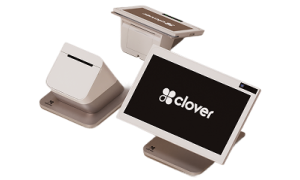
Clover Station Duo countertop POS Station Duo
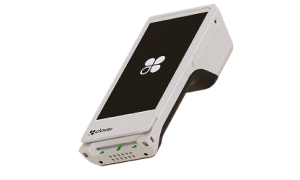
Clover Flex handheld POS Flex
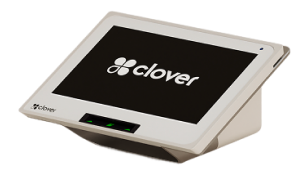
Clover Mini compact countertop POS Mini
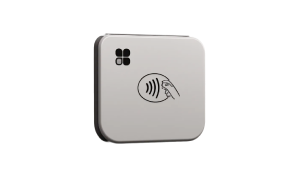
Clover Go mobile card reader Go
Also available: Compact, Kiosk, and Kitchen Display tools.
Ask about current Clover hardware promotions.Qualified merchants may be eligible for free or low-cost promotional hardware with a processing agreement.
Check eligibility
Choose your device

Start with where and how you take payments.

Use one device or combine several across the counter, tableside, checkout line, and field.

Clover Station Duo countertop POS
Best for full-service checkout

Clover Station Duo

A two-screen countertop system that lets employees run the sale while customers confirm, tip, redeem rewards, pay, and choose a receipt.

  • 14-inch employee screen and 8-inch customer screen
  • Cash drawer and high-speed receipt printer
  • Chip, swipe, tap, and mobile-wallet payments
  • Inventory, staff, customer, and sales management
Clover Flex handheld POS
Best for tableside and mobile checkout

Clover Flex

A handheld POS with a touch screen, barcode scanner, receipt printer, and Wi-Fi or LTE connectivity.

  • Take payments anywhere in the business
  • Print or send digital receipts
  • Scan 1D and 2D barcodes
  • Built for a typical full workday
Clover Mini compact countertop POS
Best for busy counters

Clover Mini

A compact countertop POS with an 8-inch touch screen for payments, item management, invoices, and business apps.

  • Chip, swipe, tap, and mobile wallets
  • Built-in receipt printing
  • Inventory, sales, and staff tools
  • Fits smaller counters
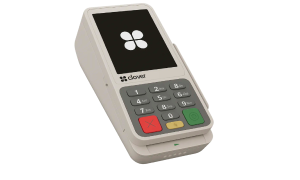
Clover Compact payment terminal
Best for simple countertop payments

Clover Compact

A small countertop terminal for businesses that need fast card acceptance without a large POS footprint.

  • Chip, swipe, tap, and PIN payments
  • Small counter footprint
  • Printed and digital receipt options
  • Works well as an additional checkout point
Clover Go mobile card reader
Best for solo and on-the-go sellers

Clover Go

A pocket-sized reader that connects to the Clover Go app for mobile chip and contactless payments.

  • Use with a compatible phone or tablet
  • Email or text digital receipts
  • Good for field service, pop-ups, and events
  • Mobile sales reporting through the app
More than a card machine

Tools to run the business after the payment.

Your Clover setup can include the software and apps that fit your industry and workflow.

Payments

Accept chip, swipe, tap, mobile wallets, tips, refunds, invoices, and digital receipts.

Inventory and items

Create products, categories, modifiers, taxes, discounts, and inventory counts.

Employees

Set permissions, track shifts and sales, and connect scheduling or payroll apps.

Customers and loyalty

Build customer profiles, issue rewards, collect feedback, send promotions, and sell gift cards.

Online ordering

Add ordering options for restaurants and manage online sales alongside in-store orders.

Appointments and invoicing

Use supported apps for bookings, estimates, invoices, and service-business workflows.

Reporting

Review sales, payments, products, employees, customers, and location performance.

App marketplace

Add accounting, payroll, marketing, delivery, eCommerce, and industry-specific apps.

Restaurant add-ons

Connect the counter, customer, and kitchen.

Add self-ordering and kitchen workflow tools when your restaurant needs more than a standard checkout.

Clover self-ordering kiosk

Clover Kiosk

Let customers browse the menu, customize items, pay, and print a receipt from a self-service screen.

  • Reduce lines and free counter staff
  • 24-inch ordering screen and 8-inch payment screen
  • Chip, swipe, tap, and debit PIN payments
Clover Kitchen Display System

Clover Kitchen Display System

Send order details from front of house to the kitchen in real time and track preparation progress.

  • Improve order accuracy and speed
  • Track prep times and station performance
  • Keep front and back of house connected
Peak Pay setup and support

We help you avoid buying the wrong Clover system.

Tell us your business type, checkout flow, locations, and must-have features. We will recommend the right devices, software plan, accessories, and processing setup.

  • Device and software recommendation
  • Merchant-account and payment setup
  • Item, tax, tip, employee, and receipt configuration
  • Accessory and additional-device planning
  • Training and launch support
  • 24/7/365 customer service and technical support

Quick device match

Sell from a phoneGo
Take payments around the businessFlex
Need a compact full POSMini
Need a simple terminalCompact
Run a high-volume counterStation Duo
Clover product features, hardware pricing, software fees, promotional offers, and availability may change. Promotional hardware is limited to qualified merchants and may require underwriting, minimum processing volume, activation deadlines, a multi-year processing agreement, equipment rental terms, and early-termination fees. Ask Peak Pay for current written pricing and complete terms before enrolling. Clover is a registered trademark of Clover Network, LLC.